
Blog · Automation
MCP n8n: create and update workflows with Claude — 2026 guide
Enable n8n’s native MCP, connect Claude Code or Desktop, then create, validate, and test workflows. Setup, limitations, and security explained.
With the native MCP server from n8n, Claude Desktop, Claude Code, or another compatible client can create and update workflows, then validate and test them. The feature is still in Public Preview: review the result before any production deployment.
Choose your MCP n8n setup in 30 seconds
The term “mcp n8n” covers several modes. The right choice depends on one question: who is the client, and where is the MCP server located?
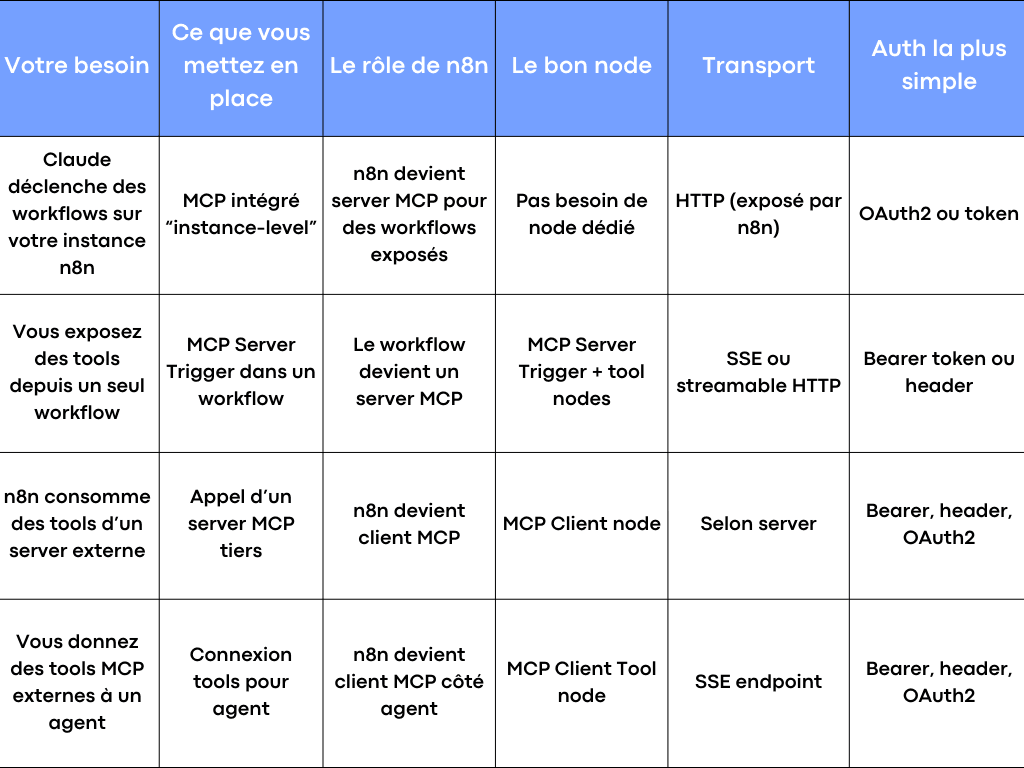
This table saves you 80% of early mistakes. Then, we’ll walk through each mode, including the config, nodes, JSON, and validation points.
MCP n8n explained: server, client, tools, node, workflow
MCP (Model Context Protocol) is a standard protocol enabling clients (Claude, IDEs, agents, scripts) to call tools exposed by a server.
In practice, MCP n8n works like this:
A client connects to an MCP server. It retrieves the list of tools. It calls a tool with an input, often in JSON. The server executes it and returns a response.
n8n integrates with MCP in three complementary ways:
- n8n can act as an MCP server at the instance level, exposing selected workflows as if each workflow were a tool.
- n8n can expose an MCP server from a workflow via the MCP Server Trigger node, executing only tool nodes—not a standard flow.
- n8n can act as an MCP client to consume external tools in your workflows or in an agent, using MCP Client and MCP Client Tool.
Remember one simple rule: to create or update workflows from Claude, start with the native MCP server. To expose one specific workflow as a custom MCP server, use MCP Server Trigger.
Mode 1: Enable n8n’s built-in MCP server (instance-level access)
This is the most direct way to work on n8n from Claude. Once MCP access is enabled, the client can create or update workflows, validate them, and run tests. It can also execute workflows you have explicitly exposed.
Enable MCP on your n8n instance
In n8n, go to Settings, then Instance-level MCP, and enable “Enable MCP access.” You must be an owner or admin. For workflow creation and updates, n8n recommends version 2.18.4 or later.
Once enabled, n8n displays a page that centralizes:
- the list of exposed workflows,
- connected OAuth clients,
- a “Connection details” button with the server URL and setup instructions.
If you are self-hosting and want to disable the feature at the config level, n8n allows you to remove MCP endpoints via the environment variable N8N_DISABLED_MODULES=mcp.
OAuth2 or token: which auth to choose for your clients
n8n offers two client-side configuration options: OAuth2 or Access Token.
OAuth2 is often the best choice when you have multiple clients, or when you want to revoke a specific client’s access. n8n lets you revoke a client’s OAuth access from the “Connected clients” tab.
Tokens are very quick for an initial test. Note: when first generated, n8n prompts you to copy the token immediately. After that, it is hidden. There is a rotation mechanism that revokes the old token and forces all clients to update.
In both cases, follow the principle of minimal access: only expose necessary workflows, and maintain upstream validation logic.
Exposing a workflow to MCP: eligibility rules
In instance-level mode, a workflow is not visible to any client until you explicitly enable it.
To be eligible, the workflow must be published and include a supported trigger: Webhook, Schedule, Chat, or Form.
This is an important design consideration: if you want a simple “tool,” a Webhook trigger is often the clearest, as you control the expected JSON input.
Helping Claude “understand” your inputs: workflow description
When an MCP client selects a workflow to execute, it needs to understand the input format. n8n recommends adding details in the workflow description, especially if you’re using a webhook trigger.
A good description saves a lot of time. It should remain simple and effective.
Example of useful content in the workflow documentation:
- What the workflow does in one sentence.
- The expected JSON fields (with examples).
- Possible values if you have options.
- The output format.
This creates a readable “contract” for both clients and agents.
Execution: what actually happens when a client runs a workflow
When a client triggers a workflow via MCP, execution proceeds as usual in n8n. You can track it in the Executions list. Once execution completes, the client retrieves the result.
There are three constraints to be aware of from the start, as they affect how you design your MCP workflows:
- n8n enforces a 5-minute timeout for executions triggered by MCP clients, even if you’ve configured something else in the workflow.
- If a workflow contains multiple supported triggers, a client may only use one—often the first.
- Multi-step human interactions are not supported, and binary input is not supported. MCP is limited to text, so JSON is preferred.
In short: for MCP n8n, prioritize fast, deterministic, and fully automatable workflows.
Connecting Claude Desktop to your n8n MCP server (instance-level)
n8n documents a straightforward pathin Claude Desktop: Settings, then Connectors, then “Add custom connector”, then enter the n8n server URL, then authorize.
If you use Claude Code via the command line, n8n also provides an example with an MCP server added over HTTP transport and an Authorization Bearer header with your token.
The key point isn’t the tool. The key point is discipline: a client must have clear access, a controlled token, and well-documented workflows.
Mode 2: MCP Server Trigger in n8n (a workflow becomes an MCP server)
This mode is highly sought after because it offers tremendous flexibility: you create a custom MCP server within a workflow, with your tools, your rules, your validation, and your nodes.
What the MCP Server Trigger node actually does
The MCP Server Trigger node exposes a URL that MCP clients can call. Clients then list the available tools and invoke a tool to perform a task.
Key difference: this node does not behave like a classic trigger that sends data to the next node. It connects and only executes tool nodes.
Another useful point: the node supports SSE and streamable HTTP but does not support stdio.
This explains why some desktop clients require a gateway.
Test URL and Production URL: understanding execution modes
The node displays a test URL and a production URL.
In test mode, n8n “listens” and displays the data in the editor when you run the workflow in test mode.
In production, the URL becomes stable once you publish the workflow. You won’t see the data in the editor, but you can view it in the Executions tab.
This is a solid design for daily work: test mode for fine-tuning inputs, production mode for deployment.
Auth and path: securing your MCP endpoint
The node allows you to enforce client-side authentication. You can choose Bearer auth or Header auth.
Use a token from the start. In production, avoid open MCP endpoints, even for a POC.
The “Path” parameter is also important. By default, n8n generates a random path to prevent collisions between nodes. You can set a clean path if you need stable URLs, for example for a template or shared documentation.
Claude Desktop configuration: JSON example with gateway
Since the MCP Server Trigger node is not in stdio mode, n8n offers a Claude Desktop configuration that uses a gateway via npx and mcp-remote, with an Authorization Bearer header.
Here’s the structure as shown in the documentation, with your values:
{
"mcpServers": {
"n8n": {
"command": "npx",
"args": [
"mcp-remote",
"<MCP_URL>",
"--header",
"Authorization: Bearer ${AUTH_TOKEN}"
],
"env": {
"AUTH_TOKEN": "<MCP_BEARER_TOKEN>"
}
}
}
}
This format is very practical for your internal clients: you give them a config template, a token, and a URL. Then, Claude can use your tools as actions.
Docker, queue mode, and reverse proxy: the two pitfalls that break MCP
On a self-hosted Docker setup, MCP n8n issues rarely come from the node. They come from the network and execution mode.
First point: in queue mode, if you have multiple webhook replicas, SSE and streamable HTTP can break if requests don’t return to the same instance. The n8n documentation recommends routing all /mcp* requests to a single dedicated instance, or having a separate replica set with a single webhook container for MCP.
Second point: behind a reverse proxy like nginx, you must configure the MCP endpoint for SSE, notably by disabling proxy buffering and adjusting options like gzip, chunked transfer encoding, and the Connection header. n8n provides an example nginx block for /mcp/.
If you remember one thing for Docker: MCP requires a persistent connection. So your network configuration must account for that.
Mode 3: n8n as an MCP client (MCP Client node) to consume external tools
Here, the term “mcp n8n” takes on another meaning: you use n8n to call tools exposed by an external server, as a normal step in a workflow.
The MCP Client node is designed for this. It allows you to connect to an MCP endpoint, select a tool, and then provide the parameters.
When this mode is the right choice
This mode is ideal if:
- you already have an external MCP server (Notion, internal, custom tool),
- you want to use it in existing workflows,
- you do not want to expose your n8n instance to external clients.
You keep n8n as the orchestrator. You consume MCP as a building block.
MCP Client node configuration: transport, auth, JSON
The node requires:
- Server Transport and MCP Endpoint URL,
- Authentication (Bearer, header, OAuth2, or none),
- Tool (the list is automatically fetched from the server),
- Input Mode: Manual or JSON.
The “Input Mode” choice is more important than it seems.
Manual is fine if the tool has 2 or 3 simple parameters.
JSON is preferable if you have nested parameters. It’s also easier to version, review, and reuse in a template.
The node also offers a timeout and a “Convert to Binary” option depending on the return type (images, audio).
In a production workflow, I recommend keeping explicit JSON. This makes validation, review, and debugging easier.
Mode 4: connect an n8n agent to external MCP tools (MCP Client Tool node)
This mode is very “agent-centric.” You want the agent to be able to select and call external tools without you hardcoding the tool selection.
The MCP Client Tool node serves exactly this purpose. It connects an agent to an MCP server and exposes its tools to the agent.
Minimal configuration
The node requires:
- a Server-Sent Events (SSE) endpoint,
- an auth method (Bearer, header, OAuth2, or none),
- a “Tools to Include” setting to decide which tools are visible to the agent.
This last point is your best governance lever.
With “All”, the agent sees everything.
With “Selected”, you create a whitelist.
With “All Except”, you block a few sensitive tools. In a client context, I prefer “Selected”. It reduces risk and improves agent quality. Fewer tools, better chosen, better documented.
The “agent” pattern that works in enterprise
An agent without safeguards is often too free. MCP n8n becomes powerful when you structure the flow.
A simple pattern:
- the agent receives the request,
- it only sees useful tools,
- a validation node checks the JSON input and limits (e.g., no CRM write if field is empty),
- then, and only then, you trigger execution.
It’s this combination that turns MCP into a real work lever, not a gadget.
MCP n8n workflow ideas that quickly deliver value
We talk a lot about protocol. In reality, what matters is the result in your workflows.
Here are examples that work well with MCP n8n, as they have a clear input, fast execution, and a useful output.
An “ops” assistant that prepares a report. The client (Claude Desktop) calls a “resume” tool with a JSON containing notes, date, and participants. n8n transforms, formats, then pushes to Notion or Google Docs. The workflow does the heavy lifting; the client guides.
A sales agent that qualifies a lead. The client sends a JSON (source, company, size, need). The workflow enriches, applies a tier rule, then returns a recommendation. If the score exceeds a threshold, a second workflow creates a task. Everything is traceable in the execution.
A support flow that suggests a reply. Claude uses a “draft_reply” tool. The workflow finds the right documentation, retrieves the ticket context, produces a response, then triggers human validation before sending.
A simple finance setup. A tool triggers an export, calculates KPIs, then returns a summary table. The client receives a structured output. The workflow keeps the history.
These examples share a common thread: you’re not trying to make MCP talk. You’re making n8n work. MCP becomes the standard access point to trigger the right workflow at the right time.
Security, access, validation: the true quality standard for MCP n8n
With “mcp n8n”, security is rarely a priority at first. Then it becomes central as soon as multiple clients appear.
A few simple principles to avoid mishaps.
Expose little. At instance-level, no workflow is exposed by default—you explicitly choose which ones are. Maintain this discipline.
Prefer OAuth2 when dealing with multiple clients. You can revoke one client without affecting the others.
If using a token, plan for rotation. n8n revokes the old token when you generate a new one. Prepare a process to update your clients.
Write workflow descriptions. This isn’t just cosmetic—it’s part of validation, as it guides clients on the correct inputs.
Add n8n-side validation for sensitive actions. A control node, field checks, or rule testing. MCP grants access. Validation builds trust.
Finally, respect MCP mode’s limits: no binary inputs, no human-in-the-loop, and a 5-minute max execution time at instance-level. This should shape your design.
Docker and configuration: what to check before opening to clients
If you’re using Docker, you have two configuration layers: n8n’s and your network’s.
On the n8n side, note that you can disable MCP entirely via N8N_DISABLED_MODULES=mcp if you need a kill switch.
On the network side, remember two rules.
SSE and streamable HTTP require a stable connection to the same instance. In queue mode with multiple webhook replicas, route /mcp* to a dedicated instance.
Behind nginx, configure the MCP endpoint for SSE. Otherwise, you’ll face dropped connections, incomplete responses, or unresponsive tools. n8n’s docs recommend disabling proxy buffering for /mcp/.
This isn’t a minor detail. If you want a reliable service for your clients, this is the foundation.
When things go wrong: quick diagnostics
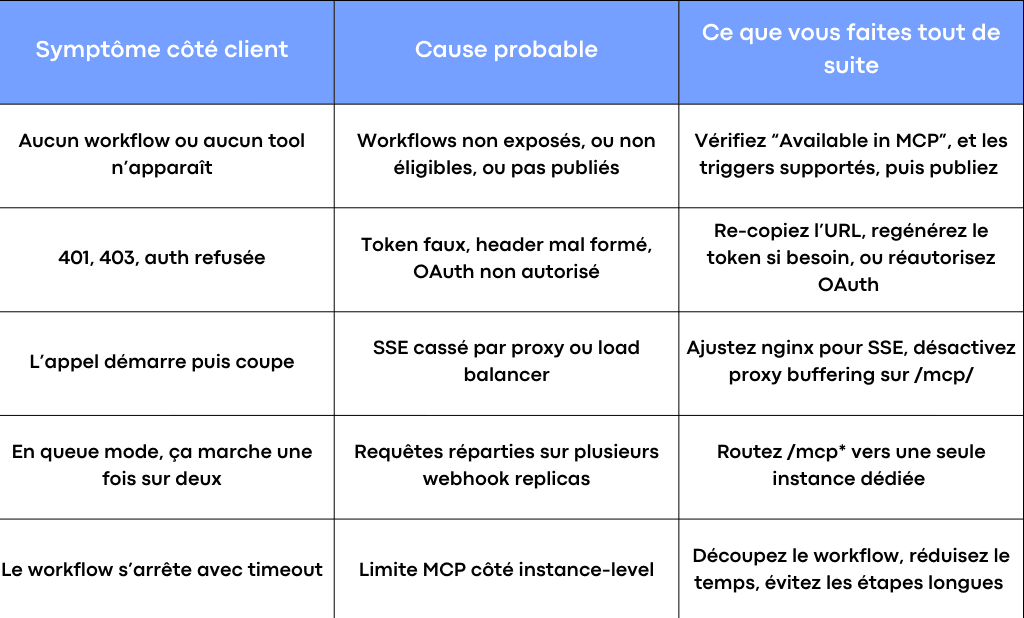
Different causes of n8n bugs
The idea is to keep it simple: MCP n8n rarely fails “at random.” It almost always fails due to access issues, network mode, or a poorly adapted workflow.
Industrializing your AI workflows in production
Connecting Claude to n8n via MCP in a demo is one thing. Keeping it in production—reliability, security, controlled costs, scalability—is another. This is Scroll’s core expertise: developing AI-assisted applications and automations, designed for production from the start.
If you have a serious AI integration project, see our code-based AI development approach or integrating Claude in enterprise. For an AI project already underway but struggling, the AI takeover diagnostic is free and commitment-free.
For an overview of the protocol and essential MCP servers, see our complete MCP 2026 guide.
The next step: industrializing MCP n8n in your stack
When MCP n8n is properly set up, you get a very tangible effect: your clients can trigger reliable workflows, your agents can use controlled tools, and your instance keeps a record of every execution.
This is also where projects are won or lost: choosing the mode (instance-level or MCP Server Trigger), workflow design, validation, Docker config, token governance, documentation, and templates for clients.
At Scroll, we help teams move from “it works on my desktop” to a clean, secure, and maintainable setup: MCP architecture, agent design, workflow overhaul, n8n industrialization, and production deployment with a validation level tailored to your context. If you want to save time and avoid common pitfalls, we can frame your “mcp n8n” use case together and deliver a configuration that stands the test of time.
Frequently asked questions
What exactly is MCP n8n?
MCP n8n is the use of MCP to connect a client (such as Claude Desktop) to n8n, enabling workflows to be used as tools. Depending on the mode, n8n acts as an MCP server (you expose tools) or as an MCP client (you consume external tools).
How to quickly connect Claude Desktop to MCP n8n?
Retrieve the MCP server URL from your n8n instance, then add a connector in Claude Desktop. Next, validate authentication via OAuth or token, and test a tool by sending a JSON input.
Which mode to choose between n8n server MCP and MCP Server Trigger?
Choose instance-level mode if you want to provide simple access to multiple workflows from a single n8n instance. Choose MCP Server Trigger if you want to expose an MCP server from a single workflow, with fine-grained control over tools, configuration, and validation.

-1-900x675.jpg&w=2048&q=75)